

Problems uploading media
Most upload problems come down to the type of file, its size or the connection. This page lists what the library accepts and what to try when a file won’t go in.
Check the file type
Section titled “Check the file type”The Add Media window lists the types it accepts. Click Library, then Media, then Add Media, and hold your mouse over the small i icon after Supported formats:.
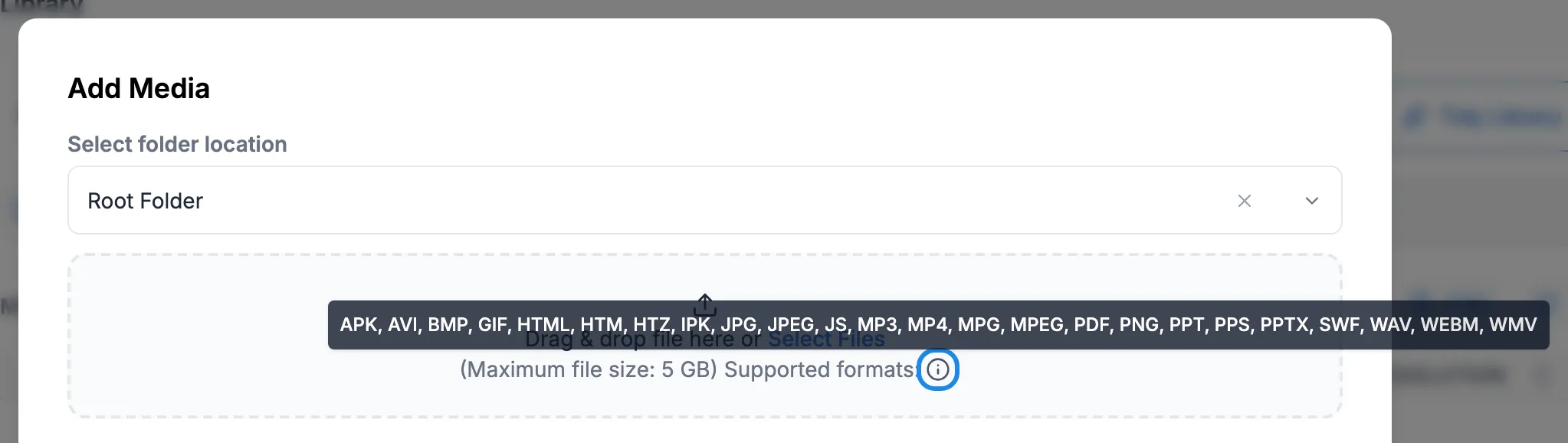
The ones you’re most likely to use are:
| Kind of file | Types |
|---|---|
| Pictures | JPG, JPEG, PNG, GIF, BMP |
| Video | MP4, WEBM, MPG, MPEG, AVI, WMV |
| Audio | MP3, WAV |
| Documents | PDF, and PowerPoint as PPT, PPS or PPTX |
| Web content | HTML, HTM, HTZ, JS |
PowerPoint files only play on Windows players with PowerPoint installed (see Choosing a player). On other screens, save the slides as pictures or a PDF and upload those.
If you try to upload a type that isn’t on the list, a red message in the corner says the file is not a supported file type and the file isn’t added.

To fix it, save or export the file in one of the types above. For example, save a Word document as a PDF, or export a design from your design app as a PNG.
Video: use MP4 with H.264
Section titled “Video: use MP4 with H.264”For video, MP4 files using the H.264 format play most reliably across every kind of player. Look for H.264 or MP4 in your video app’s export options. If a video uploads but doesn’t play on a screen, export it again as H.264 MP4 and upload that instead (see Upload media to the library for replacing a file).
Make videos the same size and shape as your screen, for example 1920 by 1080 for a landscape HD screen.
Large files
Section titled “Large files”The Add Media window shows the largest file it accepts next to Maximum file size. It currently says 5 GB. Large files take a while to upload, and then each screen has to download them too.
- Keep the Add Media window open until the list says the item is completed. Leaving the page or closing the browser tab before then stops the upload.
- Upload over a fast connection if you can.
- If the file is already online, paste its web address into File URL under Or Upload from URL and click Upload. The window says this works for files up to 2G.
- Shorter, smaller videos download to screens faster.
After a big upload, screens show Downloading in the Status column on the Displays page until they have the file.
File names
Section titled “File names”The file’s name becomes the media item’s name in the library. You can change it in the Name box in the upload list, or later by editing the item. A clear name, such as Harbour Crab Special, is easier to find than IMG_4032.
Still not working?
Section titled “Still not working?”Email hello@casty.co.uk with the file name, its type and size, what you see when you upload it, and a screenshot of any message.